Performing a backup never used to be hard, in fact, it used to be the easiest job a sysadmin could perform. So, the ever present question many sysadmins end up asking is: Why is something that used to be so easy, now so difficult? The next equally valid question is:
Why is it also so EXPENSIVE?
As with most things, we are dealing with a history lesson.
In the early days of mainframes, you dealt with a monolithic system. Everything (and I mean everything!) came from a single vendor - and that included a backup system.
How the backup system actually worked was never much of a question. It just worked OOTB (Out Of The Box). Despite this, there was a reasonable degree of busy work involved. In fact, the primary job of the sysadmin was backups.
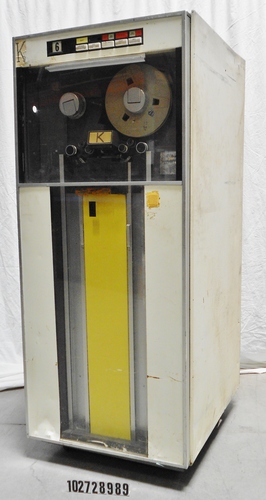
Consider the situation: You have several rows of IBM 72x TBUs all purring away madly. Now the tape software may know what tape it is writing to, but these are reel-reel tapes. There are no barcode labels to be read and no link between the media header on the tape and what you write on the tape (and it's box). You have to be super organised. A bell (literally a bell!) will go off on the operator console, you read the message to remove tape xyz01 from TBU 23 and replace it with tape qwe12 etc. So you run around like a blue-assed fly to make sure the tapes are properly stored in sequence and you know where all the catalog tapes are just in case the storage decides to die - a not uncommon occurrence.
In fact, in days of very expensive storage, tape was considered the mainstay. Several units were often dedicated for "offline" and "standby" storage. The only difference between the two was that standby storage was on tapes that hadn't been removed yet. Often the TBUs would double up - standby during the day and backup operation at night. Tape was cheap, disk was expensive.
The popularity of UNIX destroyed proprietary backup systems. On a UNIX system, a TBU was just another device to be written to or read from. The 'tar' utility (Tape ARchiver) turned one an entire subdirectory structure into a single file for writing (or reading from) a tape device. For raw block level backups of a disk volume, "dump" and "restore" were popular from early days of UNIX. All of these commands were frequently used in script. Sysadmins developed their own scripts and cronjobs. Usually, very little effort was put into documenting these scripts. The sysadmin 'knew' what was going on - and that was all that mattered.
As the desktop computer began pushing into the business computer market, initially little thought was put towards backups. You made copies of floppies and if you were lucky enough to have a hard disk drive, you just manually copied files onto floppy disk. Some early backup systems began to appear like Fastback which offered full duplex support and compression.
As the size of desktop computer HDDs increased, the ability to 'back up to floppy' dropped off considerably. Once again, proprietary backup systems began to appear. One of these was the 4mm Colorado Jumbo, which was an inexpensive TBU that connected to the FDD interface - meaning a separate controller did not need to be purchased. Colorado bundled some backup software - but it wasn't particularly good.
Around this time, Novell Netware 2 and later Netware 3.12 was increasing in popularity. Vendors would sell Netware 5 user version and install it on a glorified workstation. It was common to install either a Colorado Jumbo TBU or a more expensive QIC TBU. The latter would require a SCSI card.
However, Netware didn't have a native backup software.
About the only backup software that was available for Netware was ArcServe.
It was horrible.
Sure, it wasn't too bad at backing up your files. It just a hard time restoring them. It also had a habit of crashing servers. On Netware this was called an ABEND. Pretty soon, people the idea of setting up a dedicated backup server, so if the backup server crashed, it wasn't too bad. People also found that particular SCSI cards and TBUs caused Arcserve to be more stable than others. Particular servers were also kinder. Unfortunately, this "stability" came at a price.
Arcserve wasn't too expensive - which was its only real saving grace. The other was the complete lack of any alternative. When Windows NT came out, Arcserve made a version for it - which managed to port all the same stability problems to the new platform.
Then came Backup Exec. It was a breath of fresh air! Simple. Stable. Affordable.
Okay, it was more expensive, but you didn't need a dedicated backup server. In fact, there was a cut down version that came with a SCSI card and a Colorado Travan TBU. It all worked out of the box for under $500! Overnight, pretty much everyone switched to Backup Exec.
Successive versions added more options: open file, DR, Groupwise, BTree, NDS, Windows, Unix, Linux. However the stability gradually fell away. It was still good, but the dedicated backup server was resurrected. The price increased too. It doubled, then tripled. Soon, the best thing you could really say about Backup Exec was that it was better than ArcServe - which by now had been purchased by Computer Associates and was called ArcserveIT.
Veritas (who owned Backup exec) spawned another backup product very similar to Backup Exec - Netbackup. It became the standard for heterogeneous backup. To celebrate this, they added a zero on the price tag.
Netbackup Management Console
Then came a sequence of enterprise backup products. They were all better than Backup Exec. More stable. Heterogeneous. Great support. Agents for everything you could imagine. Policy based. But by this time, they cost in the tens of thousands of dollars.
They were Syncsort, CommVault, HP Data Protector, Portlock. No sooner did one product come out, but another did that was better with extra features.
Then the game changer of them all came out: Veeam.
It was like Backup Exec all over again. Relatively cheap. designed primarily for virtual machines, it could do what all the others struggled with: Restore a complete working server in minimal time.
Pretty soon, Veeam became the dominant backup software. It was a little feature poor at first, but you could do cloud based backup - meaning you didn't need to buy expensive tapes or TBUs. Veeam charged very little for cloud storage.
Slowly, as successive versions of Veeam came out, features were added. However costs began to go up again and reliability and stability began to drop. Veeam also started increasing the cost of cloud restore operations - so whilst backing up to the cloud was cheap, restoring from it cost a fortune!
Now, organisations using Veeam are casting around for alternatives. There's EMC Networker, Altaro, Nakivo plus there are appliance based systems like Datto that work on a different paradigm. They all have one thing in common:
They are very expensive.
The goal seems to be to create hassle free simple backups. Over time, software companies sem to forget that and overload their software with Netfeatures few people use.
It seems to me the solution is to create a two tier system: the simple software that always works and the heterogenous one that deals with all of the weird and wonderful situations.
That sounds like a simple solution, unfortunately it's always the low cost product that makes the profits and drives innovation. And nobody wants to run two pieces of software. This means the larger business that pay the most for your product, don't use the cheaper versions. When Backup Exec came out, all the large organisations stuck with ArcServe. The same is true of Veeam. Netbackup continues to hold sway in larger organisations. A quick persual of the Netbackup support forums gives the distinct impression that those who administer NetBackup have only one job to do: Backup support. If that's your only job, you don't really care that much if it's difficult to administer and requires arcane knowledge and sophisticated scripting skills. It also doesn't matter that it's hyper-expensive. In fact, that expense is a good thing as it masks you salary in the TCO.
So, I fear history is doomed to continually repeat itself. Think about that the next time a new piece of backup software appears on the market that seems too good to be true.
Updated 7th August 2020 As technology evolves, so must these blog entries. I've updated this list to cover the extensions for LTO.
I really didn't want to write this blog entry.
Really.... I didn't. If fact it took me several months of off-and-on writing to complete it.
I've been writing another soon-to-be-released generic backup article that heavily refers to tape backup mechanisms and I wanted to provide a linkable source that comprehensively explains tape technologies. Unfortunately, one does not seem to exist.
As with most things IT, explaining the technology is actually a history lesson. If you don't teach it as history you'd been forced to wonder why some idiot would design things the way they are now.
I think this would have to rate as the most boring blog entry I have ever written - not to say that my articles are boring, but some technologies are more interesting than others: And then we get to tape backup technology, which has its own special interest... nah, not at all.
Reel-to-Reel Tape
Back in the mainframe and mini-computer days of the sixty's and seventies (and into the early eighties). Tape backup units looked like the old audio reel-to-reel tape units. They were (generally) very mechanically sophisticated, even in comparison to today's technology.
Arguably, the most famous of these is the IBM 72x Tape Drive, whose life span covered three decades as the technology evolved. The 72x used half-inch 7-track tape with seven read/write heads moving at 75 inches/second. The technology morphed into the 2400/3400 series on 9-track tape used on OS/360 systems.
IBM 729
Quarter-Inch Cartridge (QIC)
In an effort to reduce size and cost of the TBU, the 3M corporation developed and released the Quarter-Inch Cartridge in 1972. It was a revolution at the time and was about two orders of magnitude cheaper than an IBM 2400, so naturally it caught on quickly. It was designed to fit a standard 5.25inch slot. The original QIC would only hold 200kB, but that quickly increased to 20MB and as the technology evolved, expanded to 500MB.
3M Quarter-Inch Cartridge (QIC)
As a robust technology, QIC lasted well into the 90s until it finally became anachronistic. It eventually morphed into the Travan technology that experienced a brief period of popularity.
Travan
Travan is an 8 mm magnetic tape cartridge design developed by the 3M company. Over time, subsequent versions of Travan cartridges and drives have been developed that provide greater data capacity, while retaining the standard 8 mm width and 750' length. Travan is standardized under the QIC body.
Travan TR-4 Tape
The Travan TBU was designed to fit a 3.5 inch slot, however it typically mounted on trays with bezels to fit a 5.25 inch slot. The TR-4 format was the first widely successful format which achieved a data capacity of up to 8GB for much less than other competing formats of the time - such as DDS.
The rise of proprietary Sony formats
In 1987, Sony introduced two new tape formats: 4mm for digital audio (DAT) and 8mm for video and data (Data8). DAT never really took off in audio circles and soon also became used as a cheaper alternative to Data8.
Sony 4mm DAT
Sony Data8 cartridge
Both formats utilised helical-scan technology which uses a rotating head to read and record data. Helical scan enables entire packets under the heads to be accessed without moving the tape. Most formats support variable speed drives, so the read/write speeds can be altered to suit the supply/demand speed of data. Due to the relatively slow tape speed inherent to helical scan
technology, the drive is also able to stop and start the tape much more
quickly to avoid the need to backhitch.
The original 4mm & 8mm formats are obsolete, but the Sony-style formats (AIT, VXA) that followed are still current. DAT (in particular) was prominent for many years due to its versatility, relatively low price and extremely small form-factor. The DAT/DDS technology evolved for many years until it exhausted further development capabilities.
Digital Data Storage (DDS)
DDS is a data storage mechanism for the Sony 4mm DAT tape format. The original DDS-1(1989) format could store 1.3GB on a 60m tape and 2GB on a 90m tape. DDS-2 (1993) increased the storage to 4GB on a 120m tape. The marketing for DDS always doubled the native capacity by assuming a 2:1 compression. DDS-3 (1996) increased capacity to 12GB whilst DDS-4 (1999) boasted 20GB. The final DDS version was marketed as DAT-72 in 2003.
Advanced Intelligent Tape (AIT)
The most compelling feature of AIT was that it was both backwards and forwards compatible. It the world of tape backups - this was fairly unique. It's second selling point was the Memory In Cassette (MIC) feature which stored the contents of the tape in NVRAM inside the tape cartridge. This provided an almost random-access capability to the technology that significantly increased the speed of data restoration.
AIT-5 Tape
The original AIT-1 released in 1996 had a capacity of 25GB. A further 4 successful variants, plus a retrofitted 'turbo' modification kept the technology going for many years before losing ground to LTO. Each successive generation: AIT-2 (1999); AIT-3 (2001); AIT-4 (2005) and AIT-5 (2006) doubled both speed and capacity to 50GB, 100GB, 200GB and 400GB respectively.
VXA
I don't have a clue what VXA stands for, but it was produced by Exabyte through a corporate merger. Despite being an extension of the Sony 8mm format, the target market for VXA was DDS.
The claim to fame for VXA was their data format called "packet technology". Each helical stripe starts with a unique packet ID and ends with an ECC
packet checksum. As each stripe is written to tape, it is immediately
read back to verify that the write was successful. If the write was not 100% successful the packet can be rewritten at
another point on the tape without stopping. When the data is read back,
the packets are reassembled into a "buffer" by their packet ID.
The underside of a VXA tape
Another aspect of VXA is that there are 2 read heads for each stripe,
slightly offset in relation to each other to allow for more flexibility
in reading tapes written by other drives.
So far, there have been three generations of VXA tapes offering 33, 80 and 160GB native storage respectively. Further generations are planned, however it is unlikely they will be commercially successful.
The rise of the Digital Linear Tape (DLT) formats.
The biggest competition for DAT and Data8 style formats is DLT. It was developed by DEC in 1984 and purchased by Quantum in 1994. The format rose to prominence where it it vied for market dominance with AIT - each generation out performing the competitors current generation.
Quantum SDLT Tape
What distinguishes DLT from the Sony formats is its use of a single reel and its "serpentine" head. With DLT, the tape travels at high speed (single speed) until it reaches the end of the tape. It then changes tracks, reverses direction, and then continues at the same speed previously in the opposite direction.
Because a DLT tape has only one reel, it immediately doubles its capacity as a function of its physical size. Dual-reel tapes by definition must have empty space in the cartridge for the unloaded reel. The other advantage of DLT is that it is over 50% wider than the 8mm formats (12.7mm). The high speed of the tape means that it can seek to the correct data location very quickly.
The disadvantages of the DLT are twofold: firstly, the mechanism for attaching to the internal reel (called hook-and-loop) is prone to mechanical failure - although this has been substantially improved with LTO.
The second-disadvantage comes from the single-speed drive. As a result, data must be read or written at a single speed. If the buffer overruns (in reading) or underruns (in writing), then the tape must stop, rewind, re-seek and then continue. This can happen several times a second and is referred to as "shoe-shining". When a DLT starts shoe-shining, performance drops dramatically.
The first really competitive DLT variant was DLT-III released in 1993 which eventually had a capacity of 10GB. It was replace a year later with DLT-IV which eventually enjoyed a capacity of 40GB.
SDLT was an improvement that added an optical servo
system to read servo patterns on the back of the tape to keep the
data tracks on the front of the tape correctly aligned with the
read/write heads. Hardware compression was also introduced with SDLT.
SDLT1 (1998) increased capacity to 160GB. SDLT2 (2004) increased that further to 300GB.
The battle between the Sony 8mm and DLT 12mm formats and how LTO won
A
technology war erupted between the various Sony and DLT formats that
spanned technological generations. Each improvement in the respective
product edged it forward as the clear leader - for a time.
By the late 1990s, Quantum's DLT and Sony's AIT were the leading
options for high-capacity tape storage for PC servers and UNIX systems.
These technologies were (and still are) tightly controlled by their
owners. Consequently, there was little competition between vendors and
the prices were relatively high.
IBM, HP and Seagate sought to counter this by introducing a more open format focusing on this market segment. Much of the technology is an extension of the work done by IBM at its Tucson lab during the previous 20 years.
Initial plans called for two LTO formats to directly compete with these
market leaders. Ultrium was half-inch tape on a single reel, optimized
for high-capacity and Accelis was supposed to be 8 mm tape on dual-reels, optimized for low-latency. It never took off.
Around the time of the release of LTO-1, Seagate's magnetic tape
division was spun off as Seagate Removable Storage Solutions, later
renamed Certrance, which was subsequently acquired by Quantum.
Linear Tape Open (LTO)
As the name suggests, LTO was developed as a non-proprietary standard based upon DLT, the standard form factor for which is branded by the name Ultrium. The initial LTO-1 released in 2000 had a native capacity of 100GB which
with compression, exceeded the capacity of SDLT1 and eventually replaced
the DLT/SDLT formats completely.
LTO-2 Tape
When LTO was originally released, it was offered in two variants: The single reel Ultrium and a dual reel Accelis. The latter did not prove popular as it offered little advantage, was more expensive and was soon dropped. Nowdays, LTO and Ultrium are considered synonymous.
Another feature of LTO is the ability to use WORM tapes. These Write-Once-Read-Many-times tapes are identical for other LTO tapes except they are encoded to not be overwritten or erased. These tapes are significantly more expensive and generally only used for SOX compliance.
LTO-2 (2003) & LOT-3 (2005) both doubled the speed and capacity to 200GB and 400GB respectively. LTO-4 (2007) doubled capacity to 800GB but increased data throughput by only 50%. LTO-5 (2010) at 1.5TB native capacity is currently the most common, however LTO-6 (2013) offers 2.5TB native storage.
LTO has a degree of backwards and forwards compatibility: An Ultrium drive reads data from a cartridge in its own generation and at least the two prior generations and writes data to a cartridge in its own generation and to a cartridge from the immediate prior generation in the prior generation format. This means you can upgrade the drive and still use your old data tapes until they are replaced by new tapes.
LTO-4 introduced AES encryption on-tape. LTO-5 introduced partitioning - which enables use of the LTFS file system, which enables a tape to be mounted as a file system as a near-line storage solution.
The magnetic servo tracks on an LTO tape are factory encoded. Using a bulk
eraser (or otherwise exposing the cartridge to a strong magnetic field)
will erase the servo tracks along with the data tracks, rendering the
cartridge unusable.
LTO Update - Added 2020
Since LTO-5, several versions of LTO were released and are planned. Some of those releases played with and even broke LTO's own compatibility rules. The rules are now:
- Up to and including LTO-7, an Ultrium drive can read data from a cartridge in its own generation and the two prior generations.
- LTO-8 drives can read LTO-7 and LTO-8 tape, but not LTO-6 tape.
- An Ultrium drive can write data to a cartridge in its own generation and to a cartridge from the one prior generation in the prior generation's format.
- Some LTO-8 drives may write previously unused LTO-7 tapes with an increased, uncompressed capacity of 9 TB ("Type M-8").
- Only new, unused LTO-7 cartridges may be initialized as LTO-7 Type M. Once a cartridge is initialized as Type M it may not be changed back to a 6 TB LTO-7 cartridge.
- LTO-7 Type M cartridges are only initialized to Type M in an LTO-8 drive. LTO-7 drives are not capable of reading LTO-7 Type M cartridges.
- To initialise an LTO-7 tape to become type 8, the barcode should end in "M8", just as the L prefix is normally used.
- LTO-7 WORM tapes will not support the M-8 format.
- Although all LTO-8 drives will support M-8 format tapes, the ability of a library to use and recognise M8 tapes is limited by the manufacturer of the library.
- An Ultrium drive cannot make any use of a cartridge from a more recent generation.
- Within the compatibility rules stated above, drives and cartridges from different vendors are expected to be interchangeable. For example, a tape written on any one vendor's drive should be fully readable on any other vendor's drive that is compatible with that generation of LTO.
The "M-8" format is itself of interest. This can be seen as am easy and cheap way of extending the capacity of an LTO-7 tape by 50% and therefore a way of re-using existing LTO-7 tapes rather than buying new LTO-8 tapes. However there are a number of problems with the M-8 format that (to me anyway) make it a non-viable option.
Firstly, tapes must be formatted from the first use for M-8 in an LTO-8 drive. The advice is that a tape must be labelled M8 in order to be formatted this way, however there are indications that thsi may not be a rock solid requirement. This is a one-way process: Once formatted, an M8 tape stays M8 for the rest of its life and similarly, L7 tapes cannot be formatted as M8.
Besides the tape label, there is no external way of knowing if the tape is an M-8 tape, even in use, other than the capacity. And if an M-8 tape is placed in an LTO-7 drive, then it cannot be read by that drive. It also will not be readable in LTO-9 drives when they are available. This makes the M-8 tapes single technology dependent - and therefore unusable for long term storage.
LTO Series specifications
LTO Tape/Drive Compatibility
LTFS (Linear Tape File System) - added 2020
With the introduction of partitioning from LTO-5, it made possible to mount tapes and have them appear as a disk drive (albeit an extremely slow one). The LTFS file system mimics read/write random access as best it can. Deleted files aren't actually deleted, they are marked as not available. Overwriting or editing a file results in a new file being written at the end of the tape.
There are only two reasonable uses of LTFS: The first is as a poor-mans backup. Without any backup software, and LTFS tape can be mount and the files to be backed up copied to tape. In reality, it is far more likely that files will be written to a single file archive and then copied to tape.
The second potential use is as "near-line" storage. Policy based file storage systems (such as moonwalk) can migrate files according to a set of rules based on age, size, type or location while keeping a placeholder in the main storage area. When a file that has been migrated to near-line storage is accessed, there is a slight delay whilst it is retrieved to live storage and then opened. In reality, TBUs are rarely used for this purpose. Nearline storage is dominated by inexpensive R/W Bluray with 50GB and 100GB capacity. Although this is much lower that LTO, the cost of Bluray media is very low and they support true random access capability. The near-line speed of a Bluray library might be 30 seconds, whereas it could be several minutes for LTO.
Tape Libraries
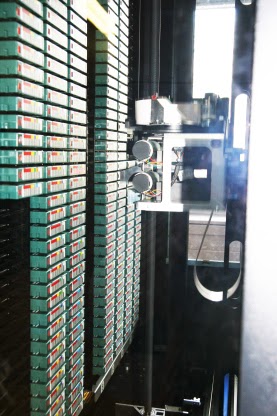
For most sites, single tape drives did not offer the capacity to backup the environment. The solution was/is a variety of tape library solutions. In general terms, a tape library provides a single storage mechanism involving one or more tape drives and a library of tapes. Tape libraries are usually managed by (expensive) tape backup and archiving software. Entry level solutions involving one or two drives and less than fifty tapes are in the order of $10,000 - $50,000. High performance robotic solutions cost between $200,000 and $1,000,000.
The actual mechanisms employed by tape-libraries vary. Older style units employed a race-track style mechanism. Newer units utilise robotic arms.
 Performing a backup never used to be hard, in fact, it used to be the easiest job a sysadmin could perform. So, the ever present question many sysadmins end up asking is: Why is something that used to be so easy, now so difficult? The next equally valid question is: